GST Configuration and Computation

As per the law issued by Govt of India, tax applicability will be as follows in GST regime,

  • Intra – State transactions will attract CGST and SGST
  • Inter  – State/Import transactions will attract IGST
  • Export transactions will be zero rated

Following condition types required,

JICG, JISG and JIIG are the deductible GST condition types for Central, State and Integrated GST. Whenever user creates an invoice using these condition types using tax code, the system will posts the accounting entry into defined GL accounts…!!

Condition types Description
JICG AP: Central GST
JISG AP: State GST
JIIG AP: Integrated GST

The setup of the GL accounts will be done for each account key

Below mentioned are the account keys to be created in SAP for deductible condition types.

  • JIC – Central GST
  • JIS – State GST
  • JII  – Integrated GST

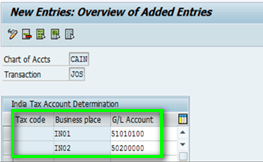
Productive GST GL accounts should be maintained in table J_1IT030K_V

Business Place Linkage to GST GL accounts is also to be assigned in table J_1IT030K_V
2017-05-20_230803

JISN, JICN and JIIN are the non-deductible GST condition types for state, central and integrated GST. Whenever user creates an invoice using these condition types using tax code, the system will posts to Inventory/Expense accounts based on the standard SAP Process.

Condition types Description
JISN AP: Central GST – ND
JICN AP: State GST – ND
JIIN AP: Integrated GST – ND

Account key “NVV” will be used for Non-deductible GST condition types

Similarly  GST relevant condition types and account keys for SD procedure are as below,

JOCG, JOSG and JOIG are the deductible GST condition types for Central, State and Integrated GST. Whenever user creates an invoice using these condition types using tax code, the system will posts the accounting entry into defined GL accounts…!!

Condition types Description
JOCG AR: Central GST
JOSG AR: State GST
JOIG AR: Integrated GST

Below mentioned are the account keys to be created in SAP for deductible condition types.

  • JOC – Central GST
  • JOS – State GST
  • JOI  – Integrated GST

As part of Cutover below mentioned master data’s has to be modified with new GST fields,

Master data – HSN/SAC Code, Material master, Customer Master, Vendor Masters, Tax codes, Condition records and service masters.

For more GST related details refer my Vlog

Thank You

Jayanth

GST – Identification number in SAP

GST – Identification number

Single registration for CGST, SGST and IGST

Individual registration to be obtained in each state of business establishment

PAN based registration number  – Up to 15 characteristics in length

2017-05-20_214549

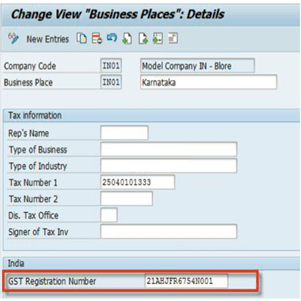
Capture GST registration number at Business Place level.

2017-05-20_214857

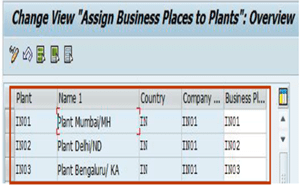
Business place has to be linked to plant

2017-05-20_215011.png

Thank You

Jayanth Maydipalle

Grant Management – Key Terminology

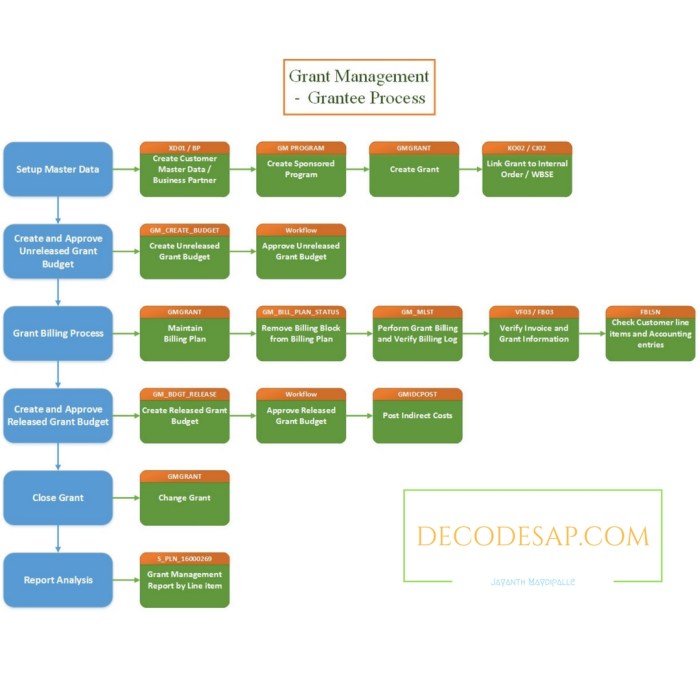
Grant: A Master Data element used to maintain the terms and conditions of the grantor’s contribution.

Fund: A fund is established for the purpose of financing fully or in part the cost of program and project activities consistent with the United Nations aims and policies. It is used to identify the source and use of funding from voluntary contributions.

Sponsor: It is a government, institution or individual that provides funding to a grantee organization.

Grantor: A donor or sponsor that provides resources to UN. UN can also act as a grantor by providing resources to other non-profit organizations such as implementing partners or end beneficiaries.

Grantee: An organization or an individual directly receiving funds from a donor or sponsor.

Donor Agreement: A legal agreement between a donor and UN outlining the terms and conditions for the use of a voluntary contribution.

Unreleased Grant Budget: A portion of the grant budget for which cash has not been received.

Sponsored Class: A class that summarizes the G/L accounts of an organization, facilitating reporting to the donor and enforcing donor restrictions. It represents the view that the sponsor wants reported back to them. It also represents the level at which the sponsor requires the processes to be controlled.

Sponsored Program: The Sponsored Program is master data that is used to capture and control the purpose of the contribution defined in the Donor Agreement. It specifies the level of earmarking of the fund and represents the programmatic view of the donor.

ACDOCP ON S/4 FINANCE

SAP S/4 Finance, 1610 has ACDOCP table for Planning, which has a similar structure to ACDOCA. SAP Plans to switch all CO objects to update ACDOCP and it would be the “Single Source” for planning data. COSP/COSS tables will be replaced with ACDOCP in future.

2017-02-17_212804

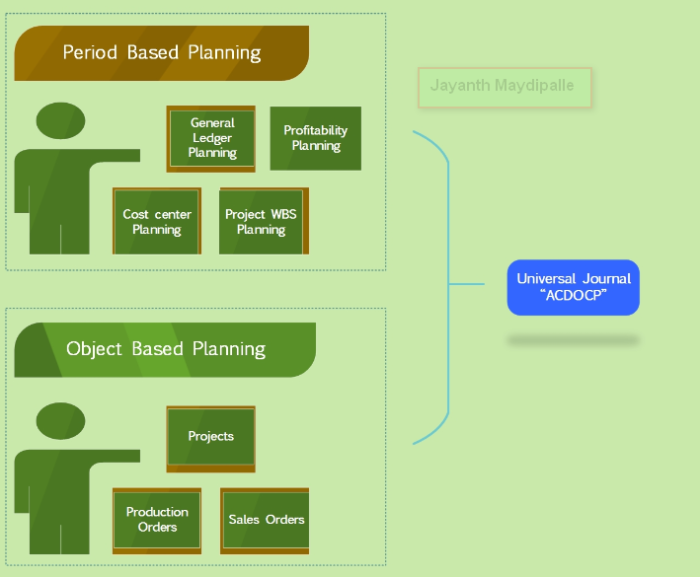
ACDOCP will gradually expand to cover “Period based planning” i,e General ledger Planning, Cost Center Planning, Project/WBS planning and Profitability Planning etc.

The Object based plans that for Projects, Sales orders, Productions orders will write into ACDOCP in future.

ACDOCA and ACDOCP  will bring the actual and the planning together all in one single source of truth.

Thank You

Jayanth Maydipalle

GST – INDIA

CGST means the tax levied under the Central Goods and Services Tax Act, 2016.

IGST means the tax levied under the Integrated Goods and Services Tax Act, 2016.

SGST means the tax levied under the State Goods and Services Tax Act, 2016.

Listed below are the important GST SNOTES released by SAP-INDIA

2419215 GST IN: Changes for FI Invoice item level screen
2419214 GST IN: Changes to MIRO Invoice item level screen
2417506 GST India – Utilities
2415115 GST India – Changes to Transaction data- Data Dictionary activities
2410917 GST IN: Line item wise tax calculation for sales invoices
2410105 GST IN: Sales related changes for India GST for sales order creation and Invoice posting
2385575 GST India – Changes to Master data
2378678 GST IN: BAdI implementation in Enjoy transactions of FI and MM
2252781 FAQ on Tax procedure migration from TAXINJ to TAXINN
1175384 Minimum Support Package(SP) level to obtain support for legal change in India Logistics and Indirect taxes(CIN)
2428495 GST India: Corrections to note 2416018
501054 FAQ: Taxes in purchasing
2014164 TAXINJ to TAXINN Migration
2421394 GST India: Pre-requisites/FAQs/Solution

Account Determination – FI – MM integration on Fiori App

This series of articles Accounting determination on Fiori is divided into three parts, 1.      Financial Accounting (FI-GL Integration) https://www.linkedin.com/pulse/account-determination-fiori-jayanth-maydipalle-?published=t

2.      Material Management (FI-MM Integration)

3.      Sales and Distribution (FI-SD Integration)

Here we go through the integration FI with MM steps on Fiori App.

  1. FI Integration with MM:

I have explained FI-MM integration in my webpage https://sapfidocz.wordpress.com/2013/08/27/sap-fi-mm-integration/

Material Management is the Costing unit for Org, they spent money so each and every activity which spent money should be captured by the Finance People.

Material Type:

Each material should assign material type in Material master record used to update whether changes made in Quantity are updated in material master record & change in value also updated in stock account.

ROH: Raw materials are always procured externally and then processed. Since raw materials cannot be sold, a material master record of this material type contains no sales data.

HALB: Semifinished products can be procured externally (sub-contracting) as well as manufactured in-house. They are then processed by the company. A material master record of this material type can contain both purchasing and work scheduling data.

FERT: Finished products are produced by the company itself. Since they cannot be ordered by Purchasing, a material master record of this material type does not contain purchasing data.

Selent Material Management to do OBYC accounting determination on Fiori app.

Transaction key:

Used to control the storage or filing of documents & assignment of documents.Used to differentiate b/w various transactions such as goods movement that occur in inventory.

BSX – Stock Posting / Inventory Posting

PRD – Price difference

GBB – Offsetting entry for stock posting

WRX – GR/IR Clearing

FRI – Freight Clearing

When GR is posted :

When you receive Goods you CAN NOT make the following entry

Inventory A/c Dr

To Vendor A/c

because, some of the goods you have received may be damaged or may not be upto the mark or for any other reason goods may reject, so before posting it to Vendor A/c we keep it in separate place till we verify the goods. And the actual entry will be:

Inventory A/c Dr (Transaction Key BSX @ OBYC)

To GR/IR A/c (Transaction Key WRX @ OBYC)

Here the goods received is Debited to inventory and Credited to a temporary A/c i.e., GR/IR a/c

When IR is posted

Here you will post the invoice after you are satisfied with the goods received, the entry will be

GR/IR A/c Dr

To Vendor A/c

Now the goods are moved from GR/IR A/c and Vendor is Credited. Now you got the final entry of Goods to Vendor Account i.e.

Inventory A/c Dr

To Vendor A/c

i.e., Inventory A/c was Debited and Vendor A/c was Credit and GR/IR A/c is Dr and also Credited hence its balance became ‘Zero’, and it has to be Zero always.

FIORI – Account Determination

SAP is now providing “Accounting determination” using Fiori for On-Premise 1610 release or higher. Let us deep dive into the steps of “Accounting determination” fiori app functionality.

The central task of G/L accounting is to provide a comprehensive picture of external accounting and accounts. Recording all business transactions (primary postings as well as settlements from internal accounting) in a software system that is fully integrated with all the other operational areas of a company ensures that the accounting data is always complete and accurate.

General Ledger Accounting is integrated with all application components of the SAP System that generate posting data of relevance to General Ledger Accounting:

“Accounting Determination” app allows us to do below mentioned integration activities,

1.      FI-GL

  • Foreign currency Valuation
  • Transfer and sort Receivables and Payables
  • Retained earnings account

2.      FI-MM Integration “OBYC”

3.      FI-SD Integration “OVKA”

Below mentioned are front-end, back-end and OData service roles needs to be assigned to view the “Account Determination” fiori app.

·        oData Service : FAC_ACC_DETERMINATION_SRV

·        Back-End Authorization Role (PFCG): SAP_BR_GL_ACCOUNTANT

·        Technical Catalog: SAP_TC_FIN_ACC_COMMON

Business Role: SAP_BR_GL_ACCOUNTANT

FI-GL Integration

Select Subarea as “General Ledger Accounting”

  • Foreign currency valuation. Currently, only transaction key KDF (under transaction group FWA) is supported. It covers T-code OBA1, tables T030H and T030HB.

Hit on Step 2 to assign the Exchange gain/loss GL accounts

Retained earnings account, it corresponds to T-code OB53, tables T030 and T030B

Click on Step 2 to select the parameters

Click on Step 3 to assign retained earnings account

Bank Account Determination for Payment Transactions in AP/AR: In ERP, it is a view cluster VC_BANKDET that can be launched in SM34. The app only supports one branch in the view cluster, for example, ‘Bank Accounts’.

Click on Step 2 to assign Bank determination GL accounts,

Using this app we do similar configuration that we do in GUI transaction – FBZP bank determination (below screen refers GUI screenshot)

 Let us do bank determination on Fiori now,

This series of articles Accounting determination on Fiori is divided into three parts,

  1.   Financial Accounting (FI-GL) https://www.linkedin.com/pulse/account-determination-fiori-jayanth-maydipalle-
  2. Material Management (FI-MM Integration) https://www.linkedin.com/pulse/account-determination-fi-mm-integration-fiori-app-maydipalle-?published=t
  3. Sales and Distribution (FI-SD Integration)